Automating Extension Setup
Instead of opening the popup and pasting your API key by hand, the extension ships a configure.html page that accepts your settings as URL query parameters and saves them straight through to chrome.storage.local — useful for provisioning many browser profiles, QA machines, or automation environments without any manual clicking.
chrome-extension://{extension_id}/configure.html?apiKey={clientKey}&isEnabled=true&captchaList=Turnstile%2CReCaptcha3%2CReCaptchaEnterprise
For the extension installed from the Chrome Web Store, {extension_id} is ddfgjpkjlpkfibegdbjfalnpgcplgomj, e.g.:
chrome-extension://ddfgjpkjlpkfibegdbjfalnpgcplgomj/configure.html?apiKey=YOUR_CLIENT_KEY&isEnabled=true&captchaList=Turnstile%2CReCaptcha3%2CReCaptchaEnterprise
If you sideload the extension manually (unpacked
.zip) instead of installing it from the Chrome Web Store, Chrome assigns it a different, random extension ID — read it fromchrome://extensionswith Developer mode on.
Query parameters
| Param | Required | Format | Notes |
|---|---|---|---|
apiKey |
Yes | string | Your clientKey. Saved, then immediately stripped from the URL bar (history.replaceState) so it doesn't linger in browser history. |
isEnabled |
No | true | false |
Master on/off switch. Accepts 1/0 too. |
captchaList |
No | comma-separated | Any of Turnstile, ReCaptcha3, ReCaptchaEnterprise. URL-encode the commas as %2C. Unknown values are silently dropped. |
repeatsCount |
No | integer 0–10 |
Extra retry attempts after a failed solve. Out-of-range values are ignored. |
debugLogging |
No | true | false |
Verbose console logging for troubleshooting. |
Only apiKey is required — omit any parameter you don't want to change.
What happens when the page loads
- The extension saves the parsed settings through the same
saveSettingspath the popup uses. - It immediately fetches your balance to confirm the key is valid.
- It shows a confirmation screen so you (or whoever is watching the automation) can visually verify the key was accepted:
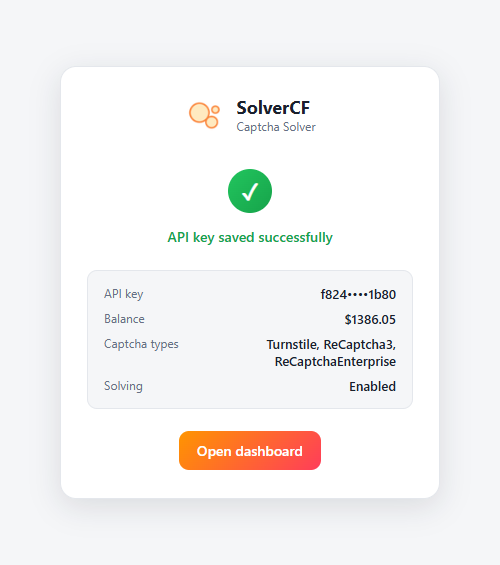
If the key is invalid, the page still saves it but shows "Key saved, but it appears to be invalid" instead of the green checkmark — check the balance shown against your Dashboard.
Important: this is not a web link
chrome-extension:// URLs cannot be opened by clicking a link on a regular website — Chrome blocks web pages from navigating to extension pages for security reasons. This URL only works when:
- Typed directly into the browser's address bar, or
- Navigated to by browser-automation tooling (Selenium, Puppeteer, Playwright, etc.) driving a Chrome instance that already has the extension installed.
Because the API key travels in plain text in the URL, only ever open it through a trusted, local automation flow — never embed it in a webpage, log it, or share the generated link.