Extension Overview
The SolverCF browser extension watches every page you open in Chrome and automatically solves Cloudflare Turnstile and Google reCAPTCHA v3 / v3 Enterprise challenges for you, billed against your existing SolverCF balance — no code required.
For the download link and click-by-click install steps, see the Extension page. This page covers how it actually works once installed.
What it solves
- Cloudflare Turnstile — both widgets embedded in a site's own form (
data-sitekeyon a<div>) and full-page "Verifying you are human" managed challenges. - Google reCAPTCHA v3 / v3 Enterprise — invisible, score-based challenges are detected and solved automatically as soon as the page renders them.
Detection and solving happen entirely inside the extension; it uses the same Create Task / Get Task Result API described elsewhere in these docs, just wired up to run automatically instead of you calling it yourself.
Setting your API key
Click the SolverCF icon in your toolbar to open the popup. Paste your clientKey from the Dashboard and click Save key — it's stored locally in the browser (chrome.storage.local) and only ever sent to solvercf.com to authenticate requests.
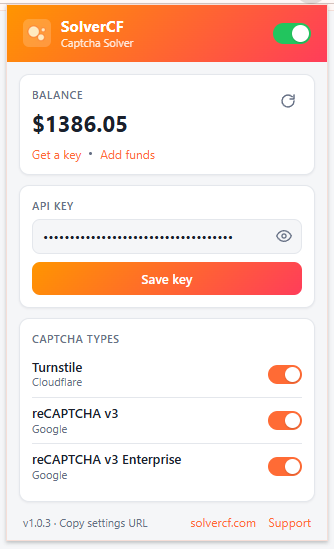
From the same popup you can also:
- Toggle the whole extension on/off.
- Turn each captcha type (Turnstile, reCAPTCHA v3, reCAPTCHA v3 Enterprise) on/off independently.
- See your live balance without opening the dashboard.
What data leaves your browser
Only what's needed to solve a detected challenge: the URL of the page containing it, the challenge's site key, your browser's user-agent, and any challenge-specific parameters present on the page (action, page data). The extension does not read page content unrelated to a captcha challenge, does not collect browsing history, and does not use the data for anything besides producing the solution token. See the full Privacy Policy for details.
Ignoring specific sites
If you want the extension active everywhere except a handful of sites, enable the ignore list and add hostnames to it from the popup's settings — those sites are skipped entirely, as if the extension were disabled just for them.
Next: Automating Extension Setup to pre-configure the API key and settings without touching the popup manually.